MP3 to MIDI Sheet Music: Turn a Melody into Readable Notes
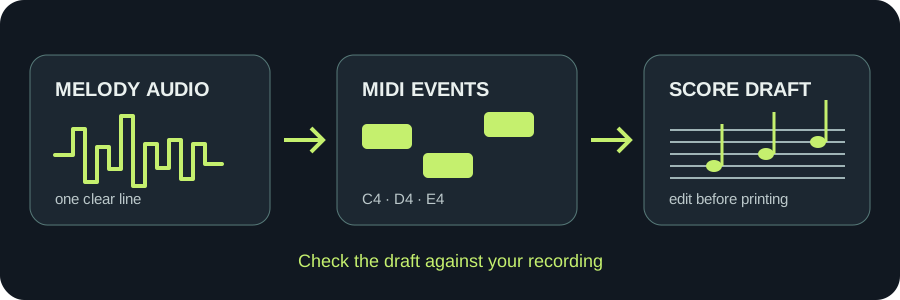
This page makes a MIDI file, not a finished sheet-music PDF. Upload a clear single-note melody, inspect the detected notes, download the .mid, then open that file in a notation editor such as MuseScore Studio. Treat its score as a draft: check pitches, rhythm, rests, and bar layout against your recording before printing.
Here: extract note events and download .mid.
In a score editor: open the MIDI and arrange readable notation.
Before sharing: compare every phrase with the source audio.
TEST YOUR FILE
Create a MIDI draft for sheet music
Inspect the notes, download .mid, then open it in your notation editor.
INPUT MP3 / WAV / M4A / FLAC / OGG → OUTPUT .MID
Drop one audio file here
or click to choose audio from your device
Choose audioMP3, WAV, M4A, FLAC, or OGG · one file · up to 50 MB / 5 minutes
Or record a short sound with your microphone.
♪
RESULT
Your MIDI is ready
HIGHLOW
Your audio stays on your device. All processing happens in this browser. No file is uploaded to a server.
No sign-upOne file at a timeNo watermark
STEP 1
Make a note file from a clean melody
Use a short, isolated line. This site's detector follows one dominant pitch at a time, so a mixed song or piano chords can lose simultaneous notes. Upload or record one source, adjust the silence and minimum-note controls only when the preview shows a specific problem, then download the .mid.
STEP 2
Open MIDI as a notation draft
The MuseScore Studio handbook says its score editor can open MIDI files. Open the downloaded .mid there, choose an instrument and inspect the displayed staff. A MIDI file carries note events; it does not preserve an engraved page layout or prove the transcription is correct.
The score is an editable interpretation of the MIDI notes, not a picture recovered from the recording.
A reproducible three-note example
The downloadable example below was generated locally by this site's current createMidi writer from three synthetic note objects. It was not transcribed from a recording and does not measure audio detection quality. With tempo set to 120 BPM and quantization off, the file has a Standard MIDI header, one track, 480 ticks per quarter note, and the following events.
Listen to the source alongside the score. Fix wrong pitches first, then extra or missing notes, note lengths and rests. After that, set sensible measures, clef and instrument for the part you actually want to read. A neat-looking page can still encode the wrong melody.
LIMIT
Do not expect an arrangement from a full mix
One dominant pitch per analysis frame cannot separate a lead line, chords, bass, and drums into independent staves. For a multi-part score, isolate parts before conversion or transcribe and edit them separately. This page does not export PDF or MusicXML; those are tasks for the notation editor after you review the MIDI.
QUICK ANSWERS
MP3 to sheet-music questions
Can I convert an MP3 straight into printable sheet music here?
No. This tool exports .mid note data. Open that file in a notation editor and check the displayed score before printing or exporting it.
Why do the bars or rests look strange after MIDI import?
Detected note starts and ends may not match the rhythmic grouping you intended. Compare the staff with the source, then edit durations, rests and measures in the notation editor.
Can the file show piano chords?
This tool follows one dominant pitch at a time. It does not extract all simultaneous chord notes from a recording, so a chord score needs another transcription method or manual editing.
Is the sample MIDI an accuracy test?
No. It starts with three known note objects and checks the site's MIDI writer. It does not test audio recognition.