mp3 to midi
Runs locally in your browser

FL STUDIO HANDOFF

Audio Clip to MIDI in FL Studio: Browser, Edison, or NewTone?

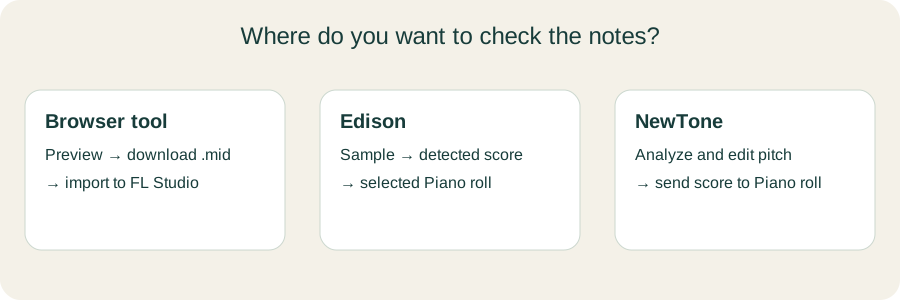
For a clear solo melody, convert the audio here, download the .mid, and import it into an FL Studio instrument channel. FL Studio also has its own routes: Edison can convert a sample to a score and dump it into the selected channel's Piano roll; NewTone can send its detected score to the Piano roll after pitch editing. These are different workflows. Check the note positions against the original sound before choosing one.

TEST YOUR FILE

Create a melody .mid for FL Studio

Inspect the notes, download .mid, then import the file to an FL Studio instrument channel.

INPUT  MP3 / WAV / M4A / FLAC / OGG → OUTPUT  .MID

Drop one audio file here

or click to choose audio from your device

Choose audioMP3, WAV, M4A, FLAC, or OGG · one file · up to 50 MB / 5 minutes
Or record a short sound with your microphone.

Your audio stays on your device. All processing happens in this browser. No file is uploaded to a server.

No sign-upOne file at a timeNo watermark

HERE THEN FL STUDIO

Start from a downloadable MIDI file

This site's detector follows one dominant pitch at a time. Convert an isolated line, inspect the piano roll, and download .mid. Image-Line's MIDI import manual says you can import through the main File menu, the Piano roll menu, or by dragging a MIDI file to the Channel Rack or Piano roll. Pick an instrument channel so the note data can sound.
INSIDE FL STUDIO

Use the editor that fits the source

Image-Line's Edison manual describes “Convert to score and dump to piano roll”: it slices the sample, detects a pitch for each slice, and sends a score to the currently selected channel. Its NewTone manual describes a pitch editor that can send a detected score to Piano roll. Check which tools your own FL Studio edition includes.

Original three-route decision diagram for browser MIDI import, Edison score detection, and NewTone pitch editing
Choose by where you want to inspect the notes: here, in Edison, or in NewTone.

One source, three checks

RouteFirst actionWhere notes appearCheck before keeping
This browser toolUpload one clear melodyPreview here; .mid imported into FL StudioPitch contour and note boundaries
EdisonLoad a sample in EdisonSelected channel's Piano rollSlice boundaries and detected notes
NewToneLoad audio in NewToneNewTone pitch view, then Piano rollDetected pitch and any intentional edits

This is an original comparison of the site's current code path with Image-Line's documented actions. It is a workflow guide, not a measured accuracy comparison. Download the decision sheet (.csv).

IMPORT DETAIL

Use the .mid extension

Image-Line's MIDI import documentation explicitly lists .mid as the import format. It also says MIDI needs an instrument to make sound. If you see notes but hear silence, inspect the selected channel and its instrument before reconverting the audio.

SOURCE LIMIT

Keep the recording as a reference

This website's code estimates one pitch per analysis frame; it cannot make a separate chord or drum score from a full mix. Edison and NewTone have their own analysis and editing paths, so a different result does not by itself prove either file is correct. Compare each result against what you can hear, then edit the note events that matter.

QUICK ANSWERS

FL Studio audio-to-MIDI questions

How do I get MIDI notes from an audio clip in FL Studio?

For a single clear melody, convert it here and import the .mid into an instrument channel. If you already have audio in Edison, its Convert to score command can send detected notes to the selected Piano roll. NewTone offers a pitch-editing route before sending notes.

Why does the downloaded MIDI make no sound?

MIDI is note data, not recorded sound. Select an instrument channel and check that the imported notes reach its instrument.

Does Edison do the same thing as this browser tool?

No. Edison analyzes slices in its own editor and sends a score to the selected channel. This tool analyzes a single dominant pitch over audio frames and downloads a .mid file.

Can I convert chords with this page?

This tool tracks one dominant pitch at a time. For a chord recording, isolate a single line if you can; otherwise use a tool designed for polyphonic transcription and inspect the output carefully.